Chapter 30: Internationalisation
In the previous chapter, we separated all of the user-facing text in our application from the code in the !RunImage file – paving the way for translations away from the default English. What we didn’t consider, however, was how we might make use of this new functionality.
If our application gains the ability to operate in more than one language, then we will need to find a way to store all of the translations within its application folder and to select the most appropriate set for the user each time it starts up.
Finding a solution to this problem is known as “internationalisation” – or “i18n” as it is often referred to.
Separate resources
Aside from the Toolbox (which does something similar to what follows), RISC OS doesn’t really define a standard way to handle different languages within an application, and it is something which is largely left up to individual developers. There are many different approaches available, but a common one is to have a folder called Resources within the application directory. This folder, in turn, contains separate directories holding the language-specific files for each translation: including the English one that we currently have. How StrongHelp handles this can be seen in Figure 30.1.
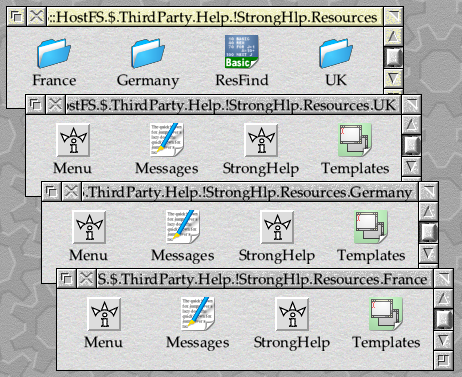
Figure 30.1: StrongHelp contains translations for English, French and German
In the StrongHelp Resources folder, files are stored in directories named France, Germany and UK – which all correspond to the names of countries supported by the International module. Given its relative popularity, this is the approach that we will be investigating here.
The fundamental support for internationalising applications on RISC OS is provided by the International module, which allows a country, alphabet and keyboard layout to be configured for the system in a manner which would be very familiar to users of the BBC Master. However, setting the country also sets the default alphabet and keyboard layout, which immediately causes a potential problem should a user wish to type on a keyboard which isn’t considered ‘standard’ for their country.
In an attempt to address some of the issues, RISC OS 3 introduced the Territory Manager. This added support for tailoring parts of applications for different regions, including dates, times and timezones. There are routines for converting the case of letters, comparing strings and providing information about how to represent numbers; the standard C library makes use of some of these if setlocale() is called.
Unfortunately the system has many drawbacks, and a search of the online forums and newsgroups will quickly reveal numerous debates about the ways in which it should be improved. Here, we will restrict ourselves to looking at the system as it currently exists, and what an application author should do now to support their international users.
Pick a country
To determine which translation to use for our application, we need to read the currently configured country from the International module and use the folder corresponding to its name. To allow for the fact that we won’t be providing translations for all of the possible countries, we should fall back to a default set if a suitable folder can’t be found. Usually this will be UK, since the vast majority of RISC OS applications appear to be written in English, but it’s at the discretion of the developer – the only requirement is that the translation must exist, and be complete.
That’s not the end of the story, however, because it has become something of a de-facto standard for an application to check its AppName$Language system variable first; in the case of our ExamplApp, this would be ExamplApp$Lanugage. If this is set, the contents should be treated as a country name and checked against the available resource folders first – only if it fails to match should the search continue further. This allows the user of our application, not to mention anyone translating it, to easily force a different set of resources to be used on demand.
This still isn’t a perfect solution, however. First of all, the close links between country, alphabet and keyboard within the International module mean that there could be other reasons than just language to choose one country over another: a machine with a French keyboard attached might need to be configured for France, whatever language the user might want. In addition, languages and countries don’t always align neatly.
For example, consider a French-speaking Canadian living in the UK. If they have a UK keyboard attached to their machine, they could well need to have the country set to UK to allow this to work, but might prefer to use their applications in French. RISC OS offers a country for Canada (in fact it offers several, to allow for the various languages spoken), but if a suitable translation isn’t available, then the user might well prefer to try France as well before settling on the language for which their machine is configured.
Alternatively, consider an Austrian who has their machine configured for Austria. In this case, their chosen country matches their language preference, but if no Austrian translation is available then software will usually fall back to UK. In most cases, our Austrian user would probably prefer that their applications offer them a translation intended for Germany first, if one is available.
To help solve issues like these, Olaf Krumnow and Herbert zur Nedden of the German Archimedes Group have devised a system known as ResFind, which has further extended the de-facto standards outlined already – a copy of the utility can be seen in use within StrongHelp in screenshot above. Two system variables, named ResConf$LanguagesPref and ResConf$LanguagesSuff, allow a list of countries to be specified for consideration before and after the configured country is tried. This way, a user can supply one of more countries that they would prefer to try before the one for which the machine is configured; alternatively, they can suggest a list of alternatives of their configured option isn’t available.
Taking all of these features together, an application should ideally do five things in sequence, in order to identify which if its resources it should use.
- If the variable AppName$Language is defined (where “AppName” is the name of the application), then treat its contents as the name of a country. If it matches the name of one of the available resource folders, use that folder.
- If the variable ResConf$LanguagesPref is defined, treat its contents as a comma-separated list of country names. If any match the the name of one of the available resource folders, then use the folder corresponding to the first match in the list.
- If the name of the system’s configured country matches the name of one of the available resource folders, then use that folder.
- If the variable ResConf$LanguagesSuff is defined, treat its contents as a comma-separated list of country names. If any match the the name of one of the available resource folders, then use the folder corresponding to the first match in the list.
- Use the resources in the folder defined as the fallback (often UK, but can be selected as appropriate by the developer).
In the case of our hypothetical Canadian, setting ResConf$LanguagesPref to “Canada1,France” would cause applications which followed the ResConf approach to try first Canada1, then France and then the configured country of UK in their quest for translations (before falling back to UK). For the Austrian, setting ResConf$LanguagesSuff to “Germany” would cause applications to try the configured country of Austria before checking Germany and then falling back to UK.
Implementing the search
The process for finding the correct set of resources sounds complicated, but fortunately it’s a common enough problem that developers can usually reach for some library code to implement it. The ResFind utility mentioned above is Freeware and can be included in software for a credit in the manual: it can be called from an application’s !Run file to set up some system variables, which the application can then use to locate things. Alternatively, SFLib’s resources library contains routines to carry out a very similar procedure – and this is the approach that we will investigate here.
At present, we use the following code to load the language-specific files inside the main_initialise() function of c.main. In both cases, we simply assume that ExamplApp$Dir is set correctly and load the file from within our application folder.
/* Load the messages file. */

if (!msgs_initialise("<ExamplApp$Dir>.Messages"))
        error_report_fatal("Failed to load application Messages");

/* Open the templates file. */

error = xwimp_open_template("<ExamplApp$Dir>.Templates");
if (error != NULL)
        error_report_program(error);
Within SFLib, the resources library includes a couple of functions to help us find internationalied resources: resources_initialise_paths() and resources_find_file(). We are already using this part of the library to load the application sprites, so we can access these without needing to include any extra header files.
After defining MAIN_FILENAME_BUFFER_LEN to be 1024, which should be long enough to cope with most reasonable RISC OS path lengths, we need to claim a couple of extra text buffers – resources and res_temp[] – on the stack when we enter main_initialise().
char resources[MAIN_FILENAME_BUFFER_LEN], res_temp[MAIN_FILENAME_BUFFER_LEN];
We then copy the path of our !ExampleApp.Resources folder (relative to ExamplApp$Dir, into the resources buffer, before calling resources_initialise_paths(). Once again, we’re using SFLib’s string_copy() instead of the more familiar strncpy() because it guarantees to return with the passed buffer correctly terminated whatever happens.
string_copy(resources, "<ExamplApp$Dir>.Resources", MAIN_FILENAME_BUFFER_LEN);
if (!resources_initialise_paths(resources, MAIN_FILENAME_BUFFER_LEN, "ExamplApp$Language", "UK"))
        error_report_fatal("Failed to initialise resources.");
The resources_initialise_paths() function is defined by SFLib as follows:
osbool resources_initialise_paths(
        char    *path_set,
        size_t  length,
        char    *appvar,
        char    *fallback
)
On entry, *path_set should point to a buffer which initially contains the path to the resources folder, and has free space at the end; the length of the buffer is supplied in len. The *appvar parameter should point to a string giving the name of the application’s AppName$Language variable (which in our case is ExamplApp$Language), and *fallback should point to a string containing the name of the fallback resource folder name.
The reason that we need to leave free space at the end of the *path_set buffer is that resources_initialise_paths() will work its way through the list of checks outlined above and append the leafnames of possible resource folders to the end of the path that we supplied. These are included in the order that they should be tested, and will be used by resources_find_file() when it is asked to locate files.
Having identified the possible places where our resources could be stored, we can use that information when loading the Messages and Templates files. SFLib defines resources_find_file() as follows.
osbool resources_find_file(
        char    *paths,
        char    *buffer,
        size_t  length,
        char    *file,
        bits    type
)
It takes a pointer to the resources[] buffer initialised by resources_initialise_paths() in *paths, and a pointer to a buffer in which to return a filename in *buffer; the length of this second buffer is given in length. A pointer to the name of the file that we are looking for is passed in *file, and the expected type of the file is given in type. For example, we might use it as follows to load our Messages file.
if (!resources_find_file(resources, res_temp, MAIN_FILENAME_BUFFER_LEN, "Messages", osfile_TYPE_TEXT))
        error_report_fatal("Failed to locate suitable Messages file");

if (!msgs_initialise(res_temp)
        error_report_fatal("Failed to load application Messages");
When called, resources_find_file() will look for a file of the given name and type in each of the folders identified by resources_initialise_paths(). If one is found, its full name will be copied into the buffer pointed to by *buffer and TRUE will be returned. If no suitable file is found, FALSE will be returned instead.
Putting all of this together inside main_initialise(), we get the code seen in Listing 30.1.
static void main_initialise(void)
{
        char            resources[MAIN_FILENAME_BUFFER_LEN], res_temp[MAIN_FILENAME_BUFFER_LEN];
        os_error        *error;
        osspriteop_area *sprites;

        /* Initialise the resources. */

        string_copy(resources, "<ExamplApp$Dir>.Resources", MAIN_FILENAME_BUFFER_LEN);
        if (!resources_initialise_paths(resources, MAIN_FILENAME_BUFFER_LEN, "ExamplApp$Language", "UK"))
                error_report_fatal("Failed to initialise resources.");

        /* Load the messages file. */

        if (!resources_find_file(resources, res_temp, MAIN_FILENAME_BUFFER_LEN, "Messages", osfile_TYPE_TEXT))
                error_report_fatal("Failed to locate suitable Messages file");

        if (!msgs_initialise(res_temp)
                error_report_fatal("Failed to load application Messages");

        /* Initialise with the Wimp. */

        wimp_initialise(wimp_VERSION_RO3, main_application_name, NULL, NULL);

        error_initialise(main_application_name, main_application_sprite, NULL);

        event_add_message_handler(message_QUIT, EVENT_MESSAGE_INCOMING, main_message_quit);

        /* Initialise library modules. */

        url_initialise();

        /* Load the application sprites. */

        sprites = resources_load_user_sprite_area("<ExamplApp$Dir>.Sprites");
        if (sprites == NULL)
                error_msgs_report_fatal("BadSprites:Failed to load application Sprites");

        /* Open the templates file. */

        if (!resources_find_file(resources, res_temp, MAIN_FILENAME_BUFFER_LEN, "Templates", osfile_TYPE_TEMPLATE))
                error_report_fatal("MissingTemp:Failed to locate suitable Templates file");

        error = xwimp_open_template(res_temp);
        if (error != NULL)
                error_report_program(error);

        /* Initialise the program modules. */

        calc_initialise();
        ibar_initialise(main_application_sprite);
        win_initialise(sprites);

        /* Close the templates file. */

        wimp_close_template();
}
Listing 30.1: Searching for international resources
Note that we have added another token – “MissingTemp” – to the messages, to cover the error if no Templates file could be located; previously we would simply have allowed xwimp_open_template() to return an error in this case. There’s no point adding messages if we fail to find the Messages file, for obvious reasons!
All that remains for us to do now is to move our Messages and Templates into a new Resources.UK subfolder within !ExamplApp, as seen in Figure 30.2, and we’re done!
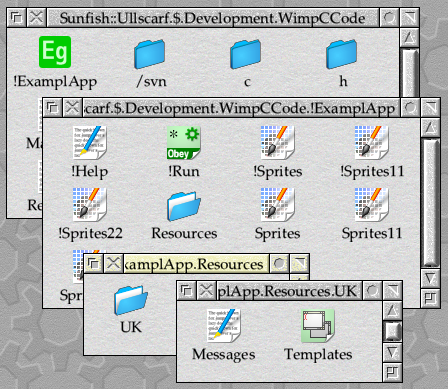
Figure 30.2: Our application now has its own Resources folder
The full changes can be found in Download 30.1.

What about !Help?
With the previous section of this chapter complete, our application now supports use in languages other than English (assuming that any translations are available). However, if you have been following closely, you might already have spotted a problem: what happens if we click on App. '!ExamplApp' → Help in the Filer menu? Or, by extension (since our application just passes the !Help file to *Filer_Run), choose Help... from our application’s iconbar menu?
The answer is that we still get our help in English, regardless of the language that the application is working in. The !Help file remains in English, and RISC OS doesn’t offer us any assistance with internationalisation – so we will need to come up with our own solution.
To solve the problem, we will need to perform a similar search through the application resources when opening the application help. Fortunately, RISC OS allows us to supply any type of file for !Help: it doesn’t have to be a text file. We could even put an executable there, such as a small BASIC utility.
Over the years, my own software has gravitated towards using a BASIC program to launch its help. In addition to internationalisation, this handles the selection of StrongHelp or HTML documents when the application supports them and the user has suitable software installed to view them; that’s outside the scope of this series, but the stripped down version in Listing 30.2 will do what we need.
REM Select help file based on available readers and selected territory.

ON ERROR PRINT REPORT$ + " at line " + STR$(ERL) : END

REM Change this directory and the names of the target files and variables as required.

TextHelp$ = "HelpText"
ResourceDir$ = "Resources"
LanguageVar$ = "ExamplApp$Language"
FallbackDir$ = "UK"

DIM b% 1023

REM Read the command line used to call the program.

SYS "OS_GetEnv" TO environment%
SYS "OS_ReadArgs", ",load=quit/K", environment%, b%, 1024

SYS "XOS_GenerateError", b%!0 TO basic$
SYS "XOS_GenerateError", b%!4 TO app_dir$

REM We're assuming that we're being run by the Filer, and so the
REM command line will start "BASIC -quit ...". If not, we don't go
REM any further.

IF basic$ <> "BASIC" OR app_dir$ = "" THEN END

REM There must also be some directory separators in the path. If there
REM are, trim the leafname off until we have a .-terminated path.

IF INSTR(app_dir$, ".") = 0 THEN END

WHILE RIGHT$(app_dir$) <> "."
        app_dir$ = LEFT$(app_dir$)
ENDWHILE

REM Assemble a comma-separated list of possible language folders.

folders$ = ""

REM Read the application language override.

SYS "XOS_ReadVarVal", LanguageVar$, b%, 1024, 0, 3 TO ,,length%,,type% ;flags%
IF (flags% AND 1) = 0 AND type% = 0 AND length% > 0 THEN
        b%?length% = 13
        folders$ += $b% + ","
ENDIF

REM Read the ResFind Language Prefix.

SYS "XOS_ReadVarVal", "ResFind$LanguagesPref", b%, 1024, 0, 3 TO ,,length%,,type% ;flags%
IF (flags% AND 1) = 0 AND type% = 0 AND length% > 0 THEN
        b%?length% = 13
        folders$ += $b% + ","
ENDIF

REM Read the currently configured country.

SYS "XOS_Byte", 70, 127 TO ,country% ;flags%
IF (flags% AND 1) = 0 THEN
        SYS "XOS_ServiceCall",,67, 2, country%, b%, 1024 TO ,claimed%,,,,length% ;flags%
        IF (flags% AND 1) = 0 AND claimed% = 0 AND length% > 0 THEN
                b%?length% = 13
                folders$ += $b% + ","
        ENDIF
ENDIF

REM Read the ResFind Language Suffix.

SYS "XOS_ReadVarVal", "ResFind$LanguagesSuff", b%, 1024, 0, 3 TO ,,length%,,type% ;flags%
IF (flags% AND 1) = 0 AND type% = 0 AND length% > 0 THEN
        b%?length% = 13
        folders$ += $b% + ","
ENDIF

REM Add in the fallback.

IF FallbackDir$ <> "" THEN folders$ += FallbackDir$ ELSE folders$ += "UK"

REM Scan through the folders until we've found the three files that we need.

text_file$ = ""

WHILE LEN(folders$) > 0 AND TextHelp$ <> "" AND text_file$ = ""
        pos% = INSTR(folders$, ",")
        IF pos% = 0 THEN
                dir$ = folders$
                folders$ = ""
        ELSE
                dir$ = LEFT$(folders$, pos% - 1)
                folders$ = MID$(folders$, pos% + 1)
        ENDIF

        IF LEN(dir$) > 0 THEN
                dir$ = app_dir$ + ResourceDir$ + "." + dir$

                SYS "XOS_File", 17, dir$ TO object_type% ;flags%
                IF (flags% AND 1) = 0 AND object_type% = 2 THEN
                        IF TextHelp$ <> "" AND text_file$ = "" THEN
                                SYS "XOS_File", 17, dir$ + "." + TextHelp$ TO object_type% ;flags%
                                IF (flags% AND 1) = 0 AND object_type% <> 0 THEN text_file$ = dir$ + "." + TextHelp$
                        ENDIF
                ENDIF
        ENDIF
ENDWHILE

REM Run the file.

IF text_file$ <> "" THEN OSCLI("%Filer_Run " + text_file$)

END
Listing 30.2: Locate the correct !Help file
We start by setting up some variables: ResourceDir$ holds the name of our application’s Resources folder, TextHelp$ has the name of the file that we will be looking for inside it, LanuguageVar$ has the name of the system variable which could contain our application’s specific language override, and FallbackDir$ gives the name of the default language directory.
The first step is to try to work out where our application, or more specifically the !ExamplApp.Resources folder, is. The !Help file can be run before a user double-clicks on the application, so there’s no guarantee that ExamplApp$Dir will have been set by our !Run file. Instead, we take the command line used to call !Help using OS_GetEnv, and hope that this is a call to *BASIC with the -load or -quit parameter followed by the full path to the program being run. OS_ReadArgs is used to tease out the bits of the command line and, if the required components are found, we then strip the leafname off the path to leave us with the dot-terminated path of the folder which the BASIC program is in.
Next we initialise folder$ to an empty string, before working through the five steps described above for locating a set of resources. At the end, folder$ should contain a comma-separated list of potential resource folder names – for example “Germany,UK” – in the order that they should be tried.
The final step is to enter a WHILE loop, testing each folder in turn using OS_File 17 until one is found which contains a text file with the correct name. If we have a filename when the loop exits, we pass it to *Filer_Run.
Armed with this utility, we can update our application so that our !Help file moves to Resources.UK.HelpText (the name given in the HelpText$ variable) and is replaced by this BASIC program. Note that the Filer can cache the details of application !Help files, so it may be necessary to close and re-open the folder after changing from text to BASIC.
The arrangement of files within !ExamplApp can be seen in Figure 30.3, whilst a full set of files can be found in Download 30.2.
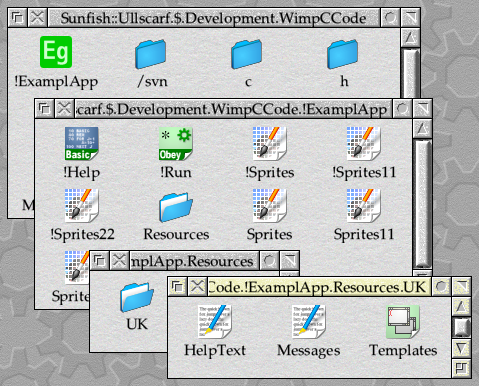
Figure 30.3: The contents of the application after updating !Help
With that, we have an internationalised version of our example application, capable of being used in any language that RISC OS supports.